Marrow keeps your record, and says what it does not do with it
Marrow keeps your record, your voice notes as transcripts and a short conversation log, and it does not sell user data, give third parties access to it, or send your contacts' data to data brokers. The app touches your phone's contacts, calendar, microphone and camera when you choose a feature that needs them.
This is a plain account of what Marrow keeps, written from the same facts sheet as the rest of this site. If something is not on this page, Marrow does not claim it. Marrow is in Beta and holds no certifications.
Five statements, and what each means
- Marrow does not sell user data. The people in your record and what you said about them are not sold, in whole or in part.
- Marrow does not give third parties access to user data. The services that run Marrow, such as the model providers, the push services and the lookup provider, receive what their part of the work needs. The security page and the privacy page have the detail.
- Marrow does not send users’ contacts’ data to data brokers. A lookup reads a public profile about someone you asked about.
- Training on data sent through the model providers’ APIs is switched off. What you send, typed, spoken or photographed, is read by a model provider through its API.
- Users can export their data. Export everything as JSON from Settings in the app, from Telegram or the web view, or ask in the Telegram chat for a contacts file.
The app asks before it reads your phone
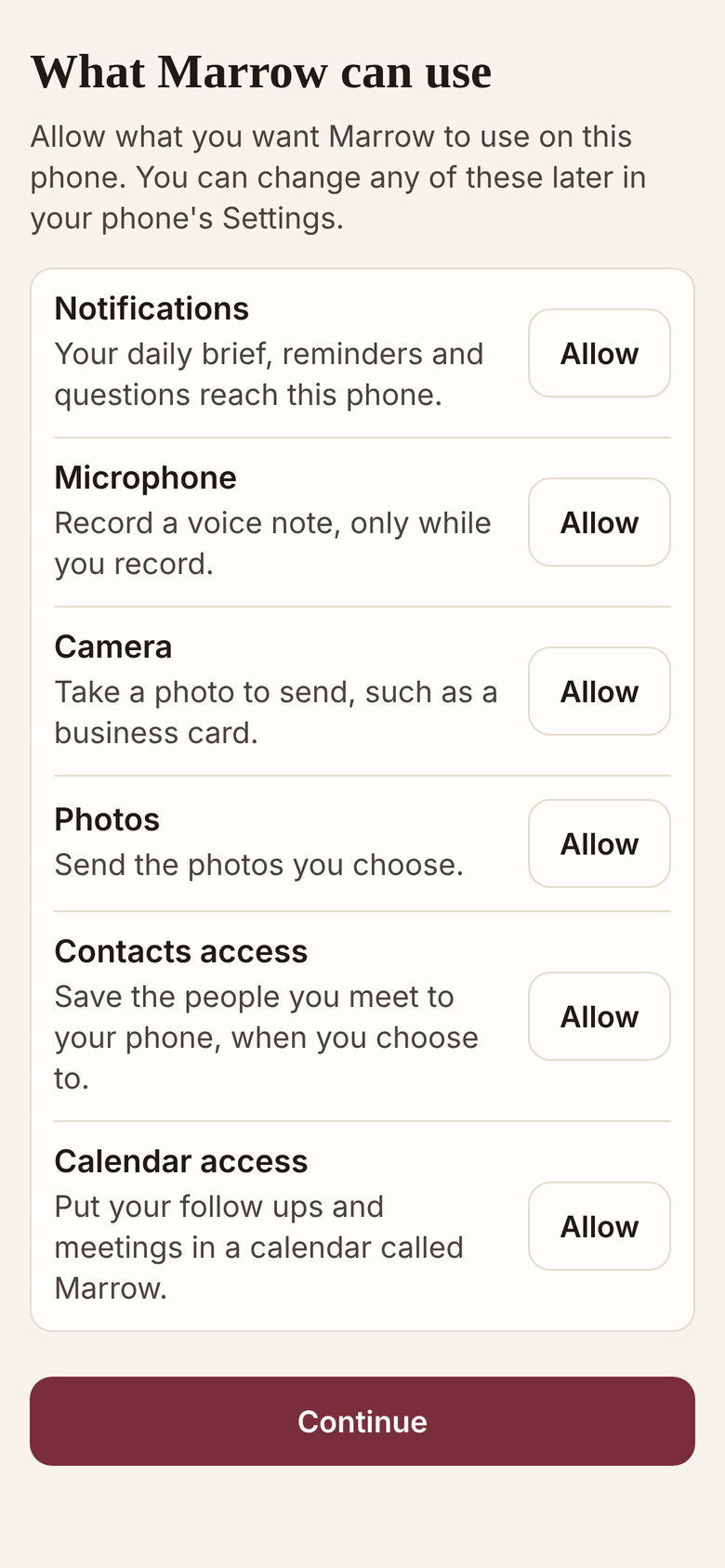
After sign in, this one screen explains each permission. Nothing is asked at launch, and a feature asks the first time it needs one.
| Part of the phone | When the app uses it | What happens next |
|---|---|---|
| Microphone | While you hold or tap the record button | The voice note is transcribed on the server and kept as a transcript |
| Camera and photos | When you choose to send a picture | A card is read into fields; a cleaned copy without location or camera data is kept for 30 days so the chat can show it, then deleted |
| Contacts | When you tap Import and allow it | Your phone’s people are matched to your record by phone, then email, then name; empty fields are filled and new people added. Nothing is deleted on either side |
| Contacts, writing | When you switch on “Marrow writes new people to this phone” | People Marrow creates from then on are added to the phone, asking first unless you chose automatic. It adds what the phone lacks and never removes anything |
| Calendar | When you switch on “Marrow writes follow ups to this phone’s calendar” | A calendar called Marrow holds your open follow ups and meetings ahead. Your other calendars are not read |
| Notifications | When “Where Marrow reaches you” is set to this app, or both | The brief, reminders and Marrow’s own questions arrive through Apple’s and Google’s push services via Expo’s push service, which receive the push token and the notification text |
The app keeps the sign in token in the phone’s secure keychain, the id of the Marrow calendar if you switched that on, the interface language and which permission explanations you have seen. It has no advertising, no third party analytics and no tracking across apps or sites.
What the server keeps, and for how long
| What | How it is kept |
|---|---|
| Your record: people, notes, follow ups, organisations and deals | In a database of your own; one database per user is the boundary between accounts |
| Voice notes | As transcripts |
| Business card photos | As the fields read from them; the cleaned copy goes after 30 days, and the card image is not attached to the person |
| The conversation log Marrow uses to follow recent messages | 30 days |
| A sample of conversations reviewed for quality | Names, companies, contact details, addresses, amounts and account numbers are replaced before anything is kept. It is on unless you switch it off, in /settings on Telegram or in the web view, not in the phone app |
| Everything, after you delete your account | Removed at once, on every channel; backup copies rotate out within 30 days |
To delete, open Settings in the app, choose “Delete my account”, type DELETE and confirm with “Delete everything”. The account deletion page has the other routes.
What the website counts
The website counts page views with a counter on Marrow’s own host. It uses no cookies and loads no third party script. It records the page viewed, the campaign tags on the link a visitor arrived from, clicks on the store badges, and the browser, system name, screen size and country. It does not record a person, and it records nothing when the browser sends Do Not Track.
What Marrow does not claim
Marrow holds no certification and makes no compliance claim or hosting region claim. Traffic is encrypted in transit, the off site backup copies are encrypted before they leave the server, and access to the servers is by SSH key only.
Questions go to hello@usemarrow.com.
Related
Get Marrow on your phone.
Install the app, sign in with your email, and send it the last business card you are still carrying. Marrow is in Beta.